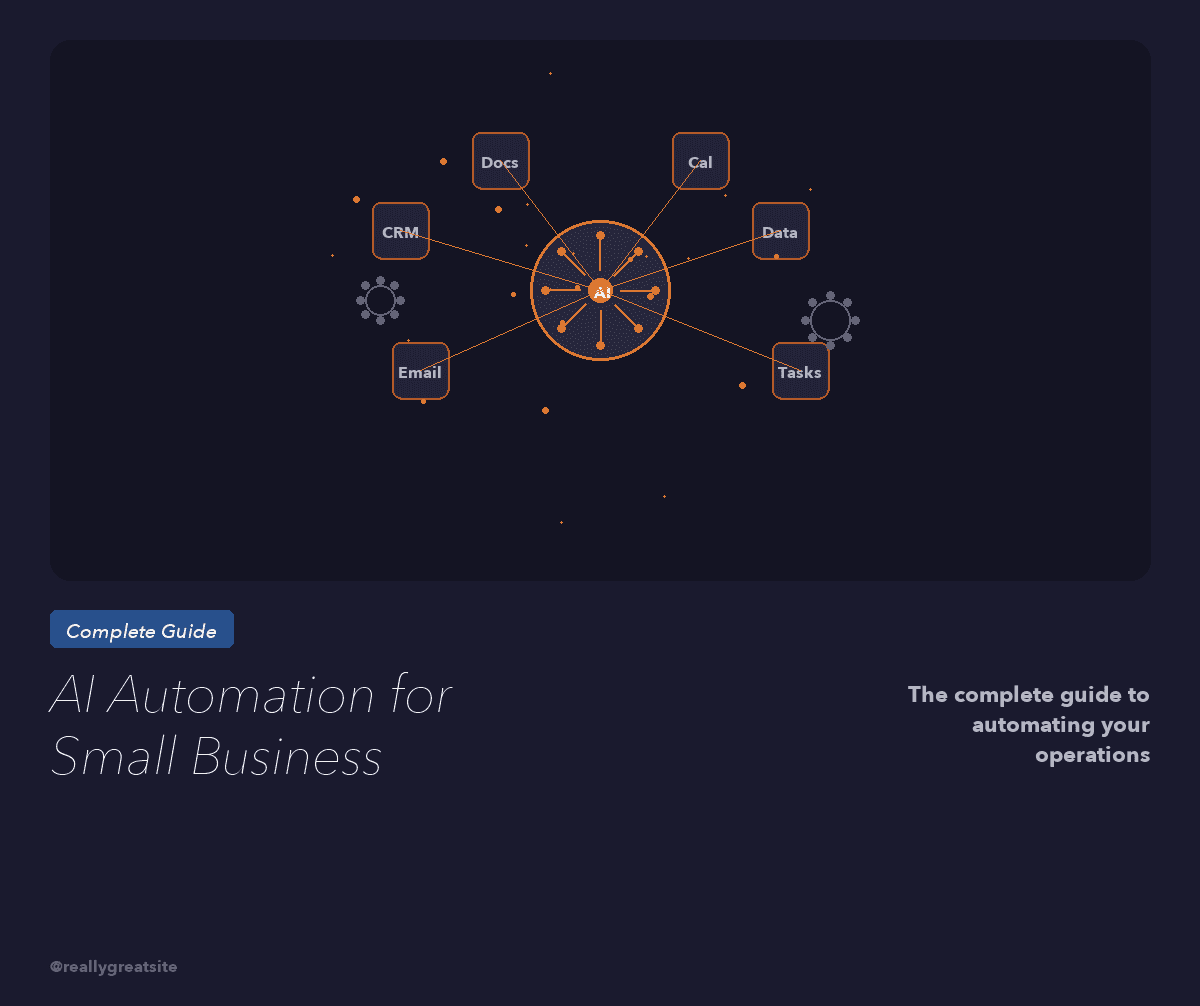
Most small businesses waste thousands on AI tools they never use. This is the implementation guide that tells you what to automate first, what to skip.
AI automation for small business is no longer optional — it is the dividing line between companies that scale and companies that stall. A 2025 McKinsey report found that small businesses adopting AI saw an average 23 percent reduction in operational costs within six months. But here is what they do not tell you: 61 percent of small business AI projects fail in the first year. Not because the technology is bad. Because the implementation is backwards.
I have helped more than 200 small business owners install AI automation systems through our AI systems services. The ones who succeed follow a specific sequence. The ones who fail skip it. This guide gives you the exact implementation roadmap I use with every client.
Key Takeaways
- Start with repetitive, high-volume tasks — not complex decision-making
- The average small business saves 12 to 18 hours per week with the right AI stack
- Expect positive ROI within 60 to 90 days on your first automation
- Most failures come from automating the wrong things, not from bad tools
- You do not need a technical background — you need a systems mindset
Want to know exactly which tasks in your business should be automated first? Let me audit your operations.
Book a Strategy SessionWhy Most Small Business AI Projects Fail
The pattern is predictable. A business owner reads an article about AI, signs up for six tools in one weekend, spends three weeks trying to configure them, gets frustrated, and goes back to doing everything manually. I have seen it hundreds of times.
The root problem is not the tools. It is the approach. Most small business owners try to automate complex, judgment-heavy processes first — things like sales strategy, creative content, or client relationship management. Those are the hardest things to automate and the last things you should touch.
According to Harvard Business Review, the businesses with the highest AI adoption success rates start with what researchers call "structured repetitive tasks" — the boring, predictable work that follows clear rules. That is where you start. Every time.
The second failure point is tool sprawl. Small businesses average 4.2 AI subscriptions within the first 90 days of adoption. Most of them overlap. You do not need four tools. You need one or two that are configured correctly and actually integrated into your daily workflow.
What to Automate First: The Priority Stack
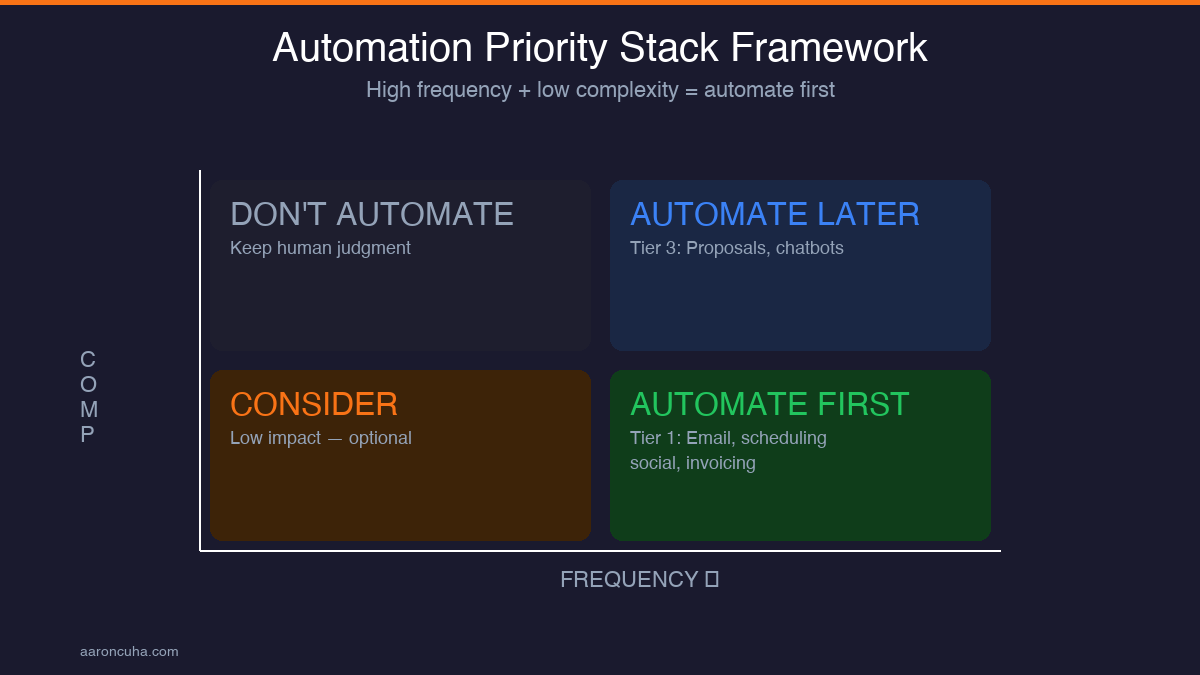
I use a framework called the Automation Priority Stack. It ranks every task in your business on two axes: frequency and complexity. High frequency, low complexity tasks go first. Low frequency, high complexity tasks go last. Here is the order:
Tier 1 — Automate immediately (Week 1-2):
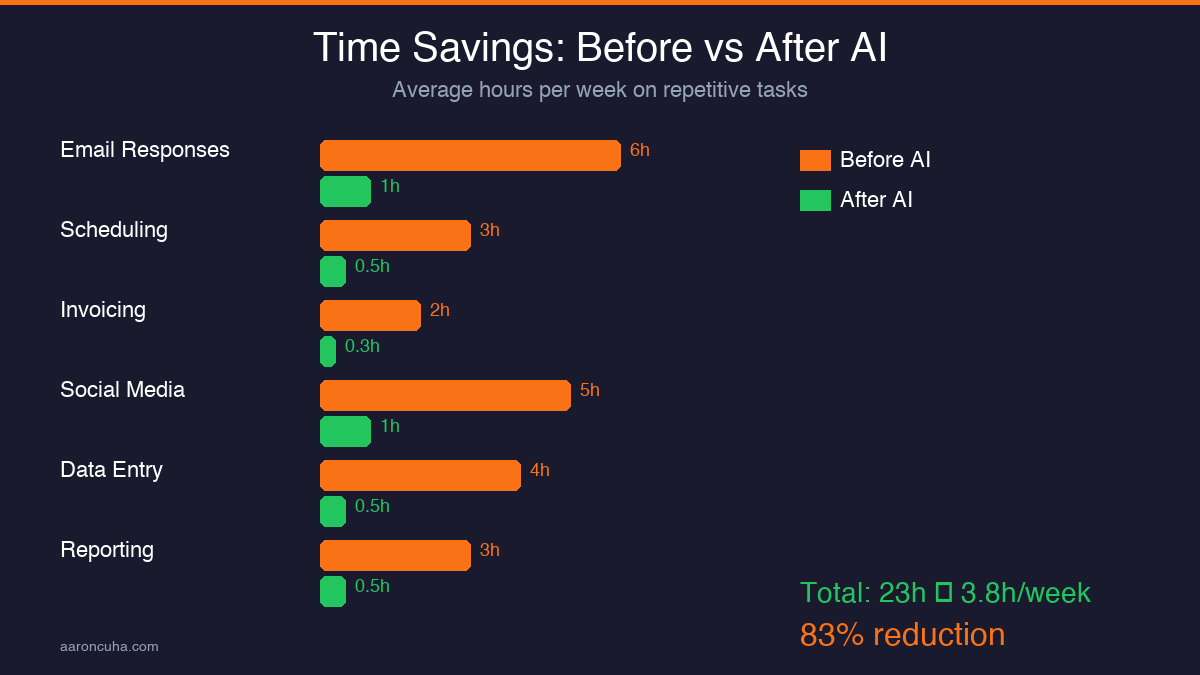
- Email responses to common questions (saves 4-6 hours per week)
- Appointment scheduling and reminders (saves 2-3 hours per week)
- Invoice generation and payment follow-ups (saves 1-2 hours per week)
- Social media scheduling and basic caption drafting (saves 3-5 hours per week)
Tier 2 — Automate in month one (Week 3-4):
- Lead scoring and CRM data entry
- Customer onboarding sequences
- Report generation and data compilation
- Content repurposing from long-form to short-form
Tier 3 — Automate in month two (Week 5-8):
- Proposal and quote generation
- Customer support chatbot for FAQs
- Competitive monitoring and market research summaries
This sequence matters because each tier builds confidence and skills that make the next tier easier. Tier 1 tasks have near-instant ROI and almost zero risk. If your email auto-responder sends a slightly imperfect reply, the consequences are minimal. That low-stakes practice is how you learn to trust and refine AI systems before applying them to higher-stakes workflows.
Realistic ROI Expectations for AI Automation
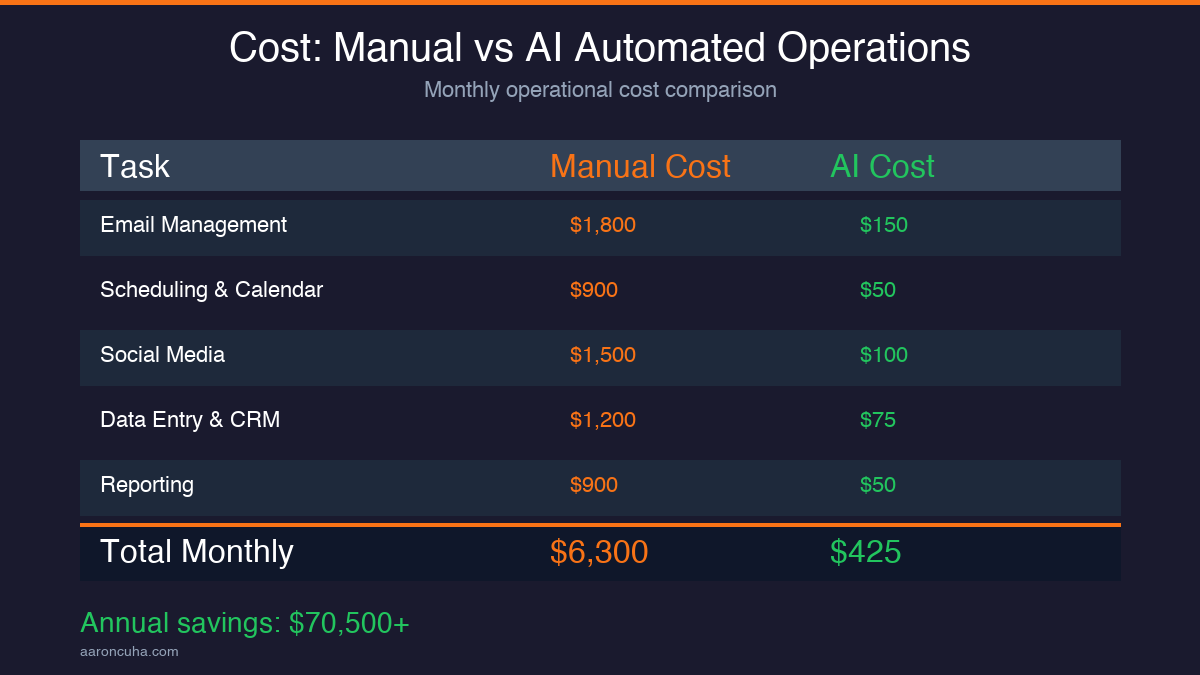
I am going to give you real numbers because I am tired of AI vendors throwing around "10x your productivity" claims with zero evidence. These figures come from 200-plus clients tracked over 12 months through our AI automation services.
Month 1: Average time savings of 8 to 12 hours per week. Average cost savings of $1,200 to $2,400 per month (based on $30 to $50 per hour task value). Average tool spend: $150 to $300 per month. Net ROI: positive by end of month one.
Month 3: Average time savings of 15 to 20 hours per week. Clients report being able to take on 20 to 35 percent more clients without hiring. Error rates on automated tasks drop by 40 to 60 percent compared to manual execution.
Month 6: Fully integrated AI workflows across operations. Average revenue increase of 18 to 25 percent attributed to capacity gains. Most clients have eliminated one full-time equivalent position worth of manual labor — not by firing someone, but by redeploying that person to revenue-generating work.
These numbers are conservative. I have case studies showing businesses that tripled their output with the same team size. But I would rather under-promise and over-deliver than hype you into unrealistic expectations. Use the ROI calculator to model your specific numbers.
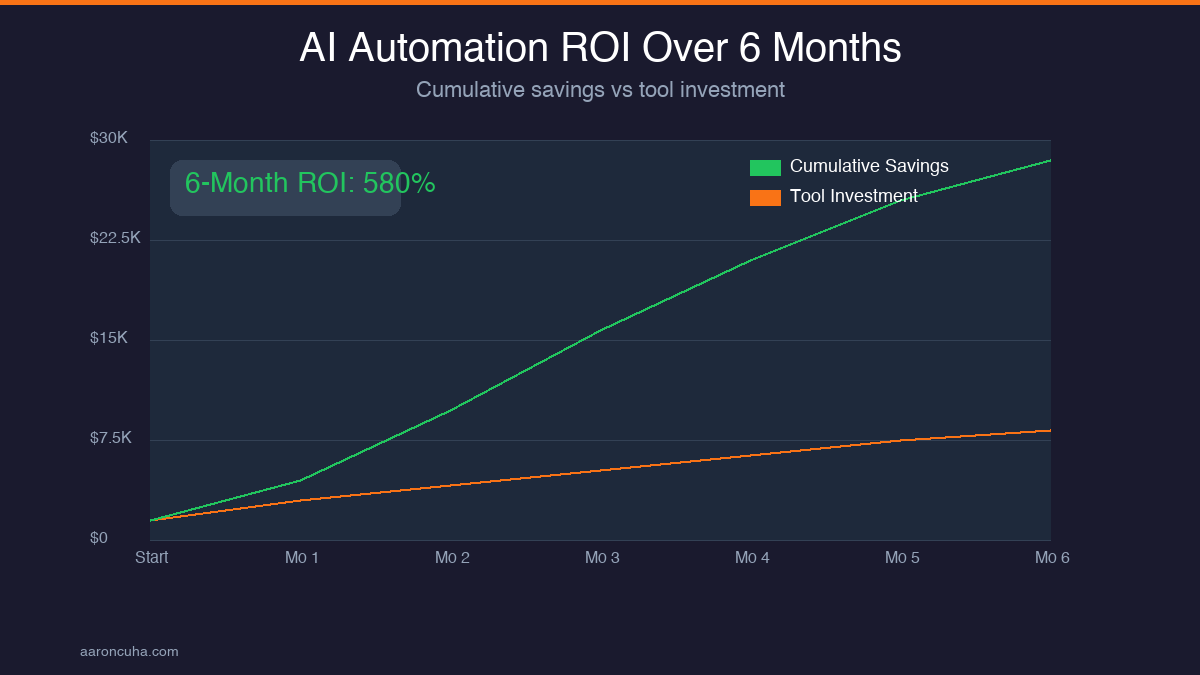
See exactly how much time and money AI automation could save your specific business.
Book a Strategy SessionThe 2026 Small Business AI Tool Stack
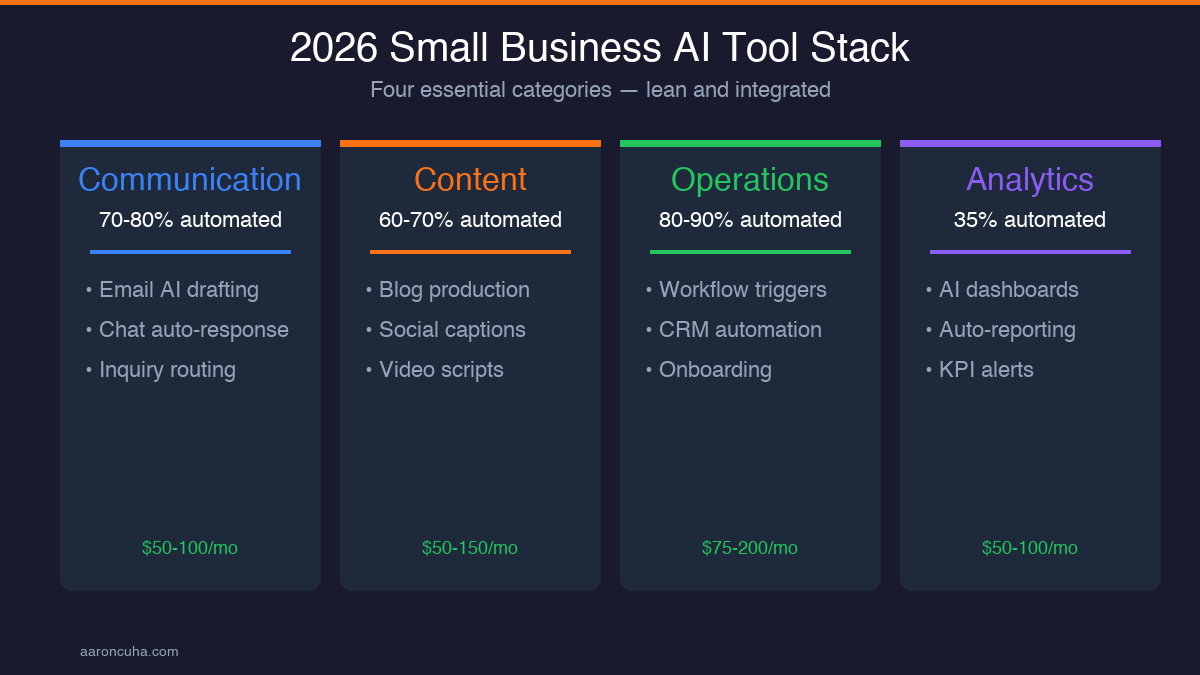
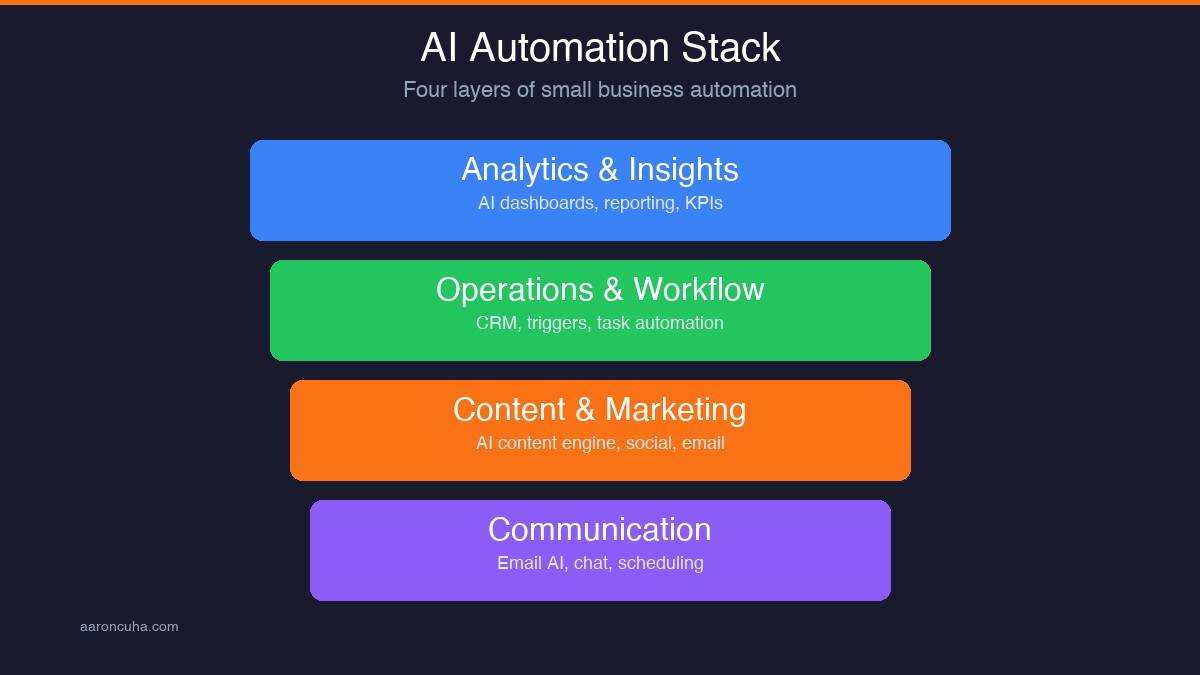
You do not need 15 tools. You need a lean stack that covers four functions: communication, content, operations, and analytics. Here is what I recommend to every small business client in 2026:
Communication: An AI-powered email and chat system that drafts responses, categorizes inquiries, and escalates complex issues to you. This handles 70 to 80 percent of routine communication without your involvement.
Content: An AI content engine that takes your core ideas and produces blog posts, social media captions, email newsletters, and video scripts. I teach this system in detail in my AI content engine post. The key is that you provide the thinking — AI handles the production.
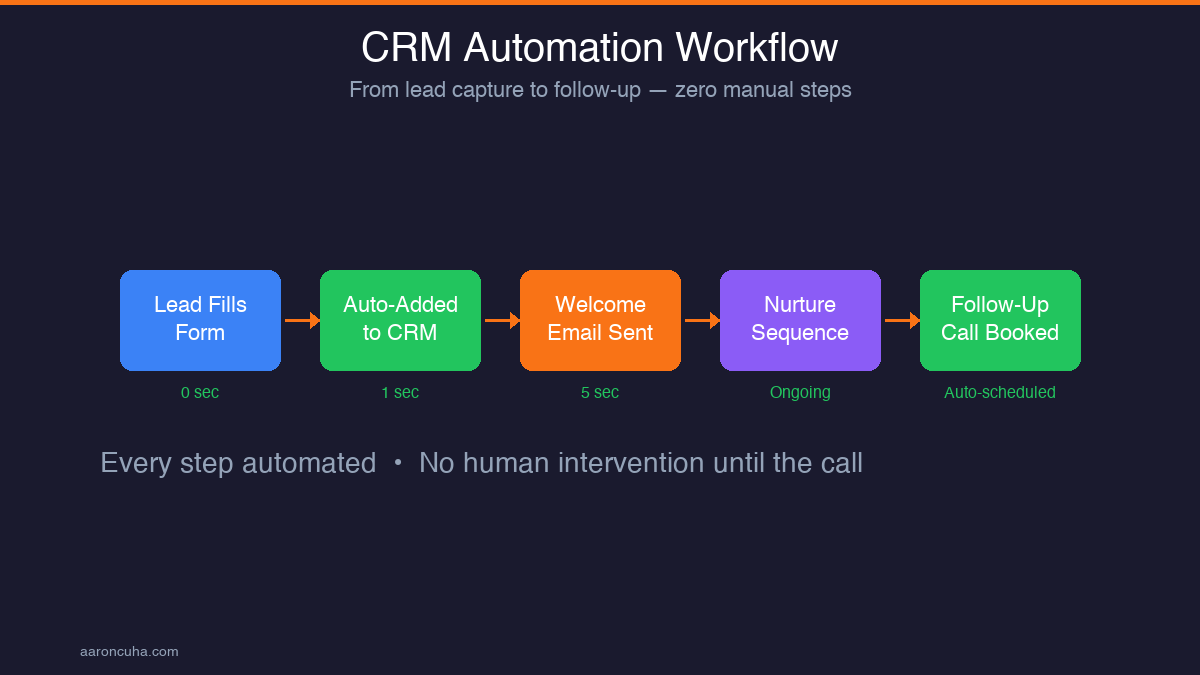
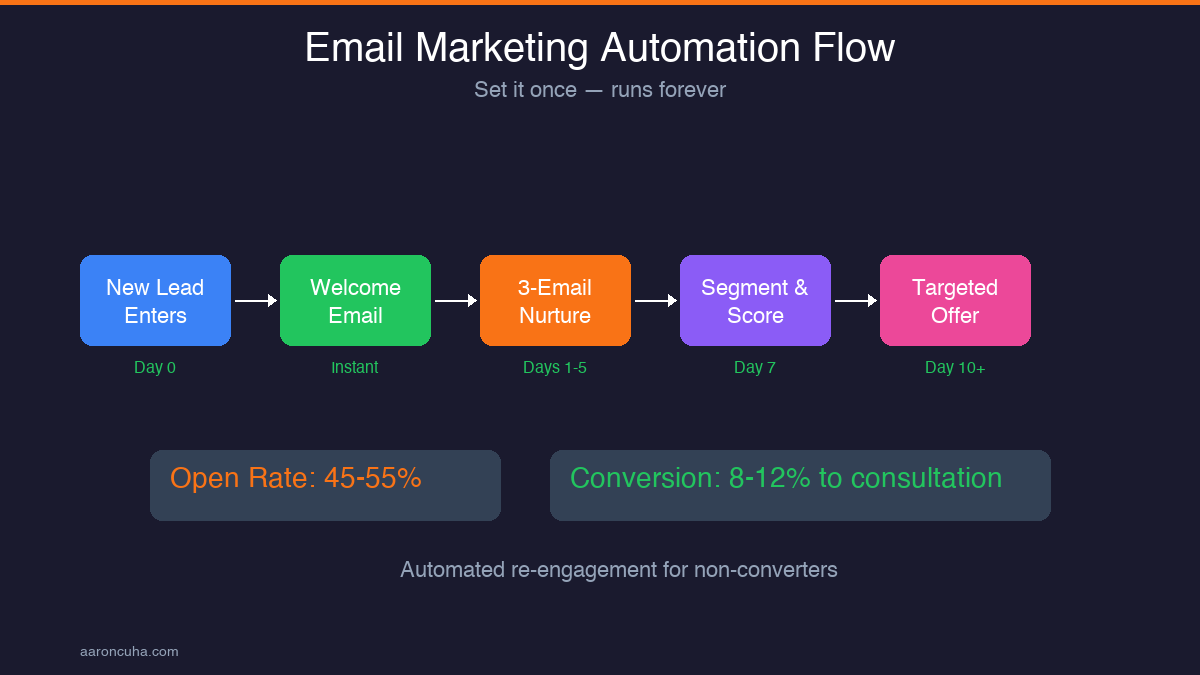
Operations: A workflow automation platform that connects your tools and triggers actions based on events. When a lead fills out a form, they automatically get added to your CRM, receive a welcome email sequence, and get scheduled for a follow-up call. No human touches it until the call happens.
Analytics: AI-powered dashboards that pull data from all your platforms and surface the metrics that matter. Instead of spending two hours compiling a weekly report, you get a summary delivered to your inbox every Monday morning. According to Gartner, businesses using AI-driven analytics make decisions 35 percent faster than those relying on manual reporting.
Total monthly cost for this stack: $200 to $500 depending on business size. Total time saved: 15 to 25 hours per week. That math works for any small business.
The 5 Mistakes That Waste Thousands
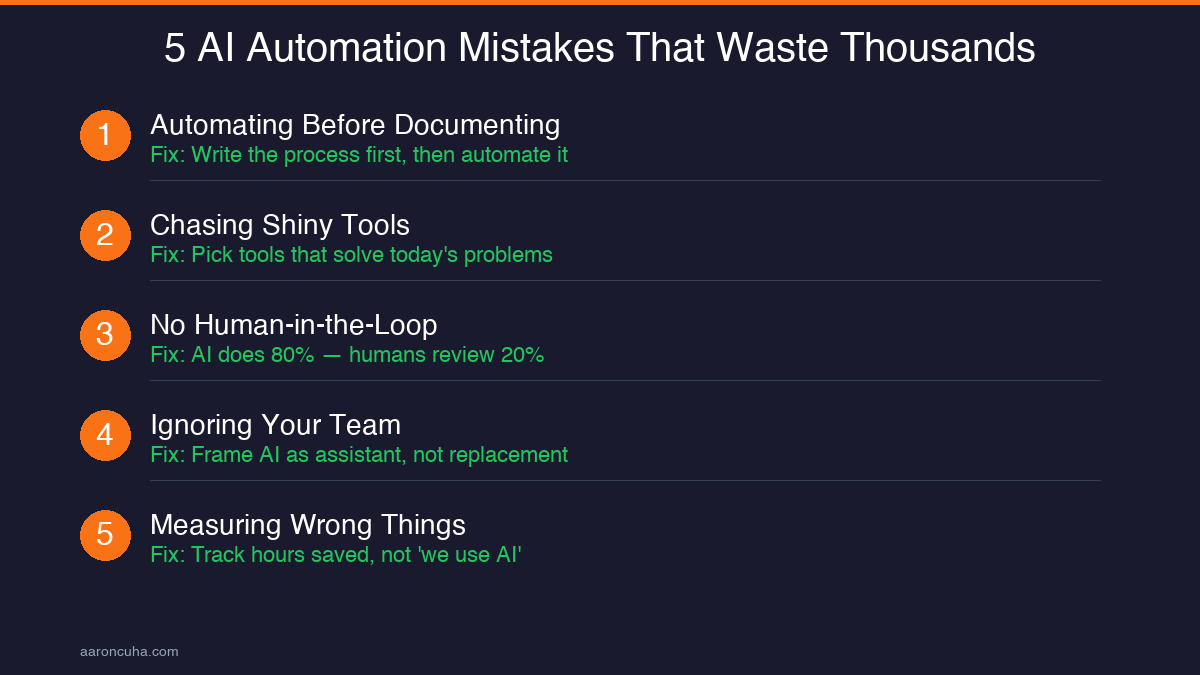
I see these mistakes every week. Avoid them and you are already ahead of 80 percent of small businesses attempting AI automation.
Mistake 1: Automating before documenting. If you cannot describe a process step-by-step on paper, you cannot automate it. Document first. Then automate. Most business owners skip this and wonder why their automations break. I cover process documentation in depth in my Systems Over Hustle framework.
Mistake 2: Chasing shiny tools. A new AI tool launches every 48 hours. You do not need to try all of them. Pick tools that solve a specific problem you have right now. Not a problem you might have someday.
Mistake 3: No human-in-the-loop checkpoints. AI should handle the first 80 percent of any task. A human should review the last 20 percent — especially for client-facing communication. Full autonomy without oversight is how you get embarrassing emails sent to your best clients.
Mistake 4: Ignoring your team. If your employees are afraid AI will replace them, they will sabotage adoption. Frame AI as their assistant, not their replacement. The businesses I see with the highest adoption rates are the ones where leadership explicitly says: "AI handles the grunt work so you can focus on the work that matters."
Mistake 5: Measuring the wrong things. "We use AI" is not a metric. Hours saved per week, cost per lead, response time, error rate — those are metrics. If you cannot measure the impact, you cannot justify the investment or improve the system.
The 90-Day Implementation Roadmap
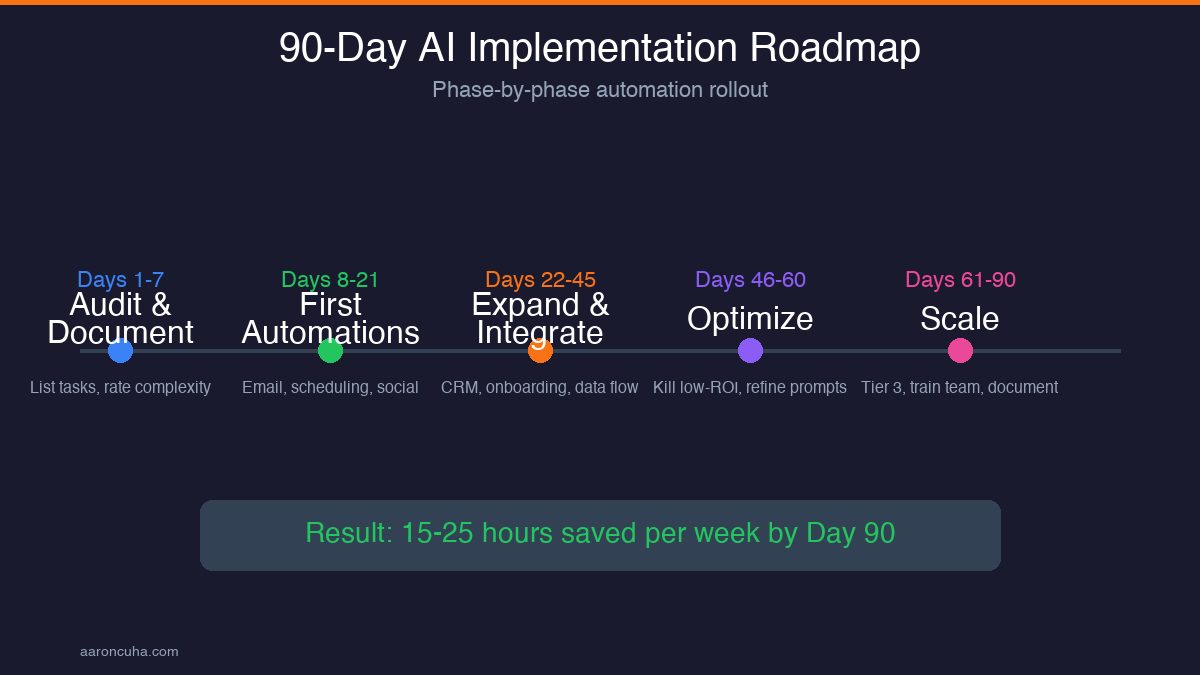
Here is the exact 90-day plan I walk clients through. It works for businesses with 1 employee or 50.
Days 1 to 7 — Audit and document. List every recurring task in your business. Estimate time spent on each per week. Rate each on a 1 to 5 complexity scale. Sort by highest time, lowest complexity. That is your automation priority list.
Days 8 to 21 — First automations. Set up Tier 1 automations from the Priority Stack. Focus on email, scheduling, and social media. Spend 30 minutes per day monitoring outputs and refining prompts or settings.
Days 22 to 45 — Expand and integrate. Add Tier 2 automations. Connect your tools so data flows between them without manual transfer. Build your first automated client onboarding sequence. Track time savings weekly.
Days 46 to 60 — Optimize. Review every automation you have built. Kill the ones that are not delivering clear ROI. Double down on the ones that are. Tighten your prompts. Add edge-case handling. This is where most of the long-term value comes from.
Days 61 to 90 — Scale. Add Tier 3 automations. Train your team on the systems. Document everything so the systems run without you. By day 90, your AI infrastructure should operate as a background system — not something you think about daily, but something that quietly saves you 15 to 25 hours every week.
If that roadmap feels overwhelming, you do not have to do it alone. Our AI automation services walk you through every step with hands-on implementation support. Check out the case studies to see what other small business owners have achieved.
What Comes After the First 90 Days
Once your foundation is solid, the compounding effects begin. Clients who stick with AI automation past the 90-day mark report that they find new automation opportunities every week — not because they are looking for them, but because their AI-trained mindset starts spotting inefficiencies automatically.
The businesses that will dominate their markets over the next five years are not the biggest or the best funded. They are the ones with the best systems. AI automation is the single highest-leverage system you can install in a small business today. Not because it replaces people — but because it frees people to do work that actually moves the needle.
The question is not whether you can afford to implement AI. It is whether you can afford not to. Every week you delay is a week your competitor gains ground. Start with Tier 1. Follow the 90-day roadmap. Measure everything. And if you want help, book a strategy session and let me show you exactly where to start.
Ready to install AI automation systems that actually produce ROI? Let me build your 90-day roadmap.
Book a Strategy SessionFrequently Asked Questions
How much does AI automation cost for a small business?
Most small businesses spend $200 to $500 per month on AI tools. The ROI typically exceeds that within the first 30 days through time savings alone. The bigger cost is implementation time — expect to invest 5 to 10 hours in the first two weeks setting up your initial automations.
Do I need technical skills to implement AI automation?
No. The tools available in 2026 are designed for non-technical users. If you can use email and a spreadsheet, you can set up AI automations. What you do need is a systems mindset — the ability to break a process into steps and define rules for each step.
What is the first thing I should automate in my business?
Email responses to frequently asked questions. It is high volume, low complexity, and delivers immediate time savings. Most businesses reclaim 4 to 6 hours per week from this single automation.
How long does it take to see ROI from AI automation?
Tier 1 automations typically deliver positive ROI within 30 days. Full-stack automation across your business shows measurable revenue impact within 90 days. The key is starting with high-frequency, low-complexity tasks where the time savings are immediate and obvious.
Will AI automation replace my employees?
No. AI replaces tasks, not people. The most successful implementations redeploy team members from repetitive tasks to revenue-generating activities. Businesses that frame AI as a replacement tool see lower adoption rates and worse outcomes than those that frame it as an assistant.
What if my AI automation makes a mistake with a client?
This is why human-in-the-loop checkpoints matter. AI handles the first draft or first pass. A human reviews anything client-facing before it goes out. Over time, as the system learns your voice and preferences, the error rate drops below 5 percent — but you should always maintain review checkpoints for high-stakes communication.
Can AI automation work for service-based businesses?
Service-based businesses are the best candidates for AI automation because they have high volumes of repetitive communication, scheduling, and follow-up tasks. Coaches, consultants, agencies, and professional service firms typically see the fastest ROI because so much of their operational overhead is administrative.
How do I choose the right AI tools for my business?
Start with the problem, not the tool. Identify your three highest-time, lowest-complexity tasks. Then find the simplest tool that solves each one. Avoid platforms that promise to do everything — they usually do nothing well. A lean stack of two to three specialized tools outperforms an all-in-one platform every time.

Written by
Aaron CuhaAuthor of Crazy Simple YouTube, keynote speaker, and executive coach with 20,000+ hours logged. ICF PCC, NLP Master Practitioner, and DISC Certified. Aaron helps entrepreneurs replace hustle with AI-powered systems that generate leads, content, and revenue on autopilot.